> ## Documentation Index
> Fetch the complete documentation index at: https://docs.gleef.eu/llms.txt
> Use this file to discover all available pages before exploring further.
# Introduction
> Manage translations, review changes, and customize AI rules in a centralized web platform
# Gleef Studio
Gleef Studio is a centralized web platform for translation management, offering a complete workflow from draft creation to publication. Built for teams and individuals who need professional translation control beyond automated tools.
 ## What is Gleef Studio?
Studio provides a web-based interface where you can:
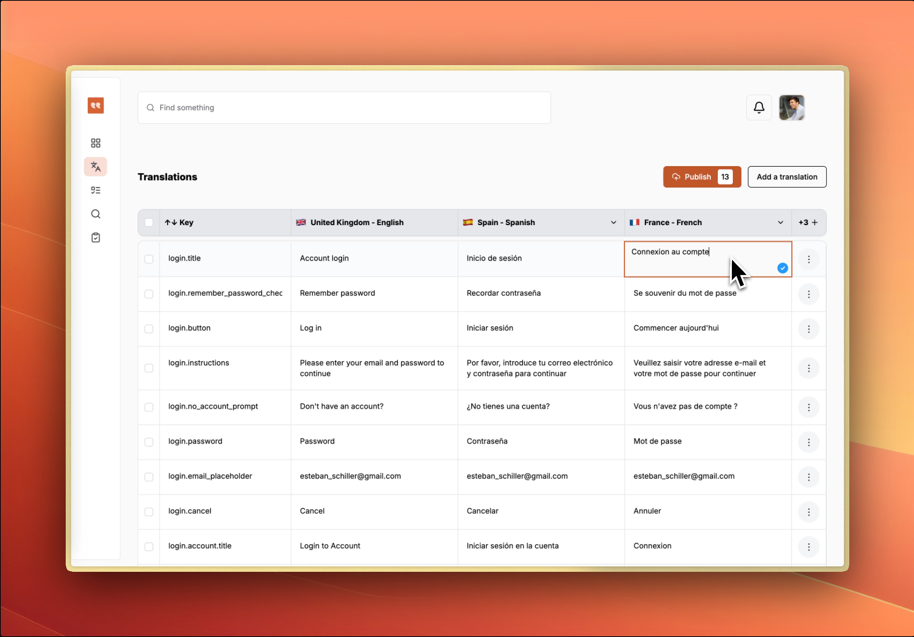
* **Edit translations** directly in a table view across multiple languages
* **Review and approve** changes through a structured workflow
* **Create custom rules** to guide AI translation behavior
* **Search and organize** translations and rules across projects
* **Collaborate** with team members on translation projects
## Key Features
## What is Gleef Studio?
Studio provides a web-based interface where you can:
* **Edit translations** directly in a table view across multiple languages
* **Review and approve** changes through a structured workflow
* **Create custom rules** to guide AI translation behavior
* **Search and organize** translations and rules across projects
* **Collaborate** with team members on translation projects
## Key Features
 **Translation Management**
Edit translations in a spreadsheet-like interface with real-time collaboration and auto-save functionality.
**Review System**
Organize changes into reviewable changesets with approval workflows and team collaboration features.
**Translation Rules**
Create custom guidelines to ensure AI translations match your brand voice and formatting requirements.
**Search and Discovery**
Find translations and rules quickly across your entire project with unified search functionality.
**Integration Ready**
Connect with Figma for design context, CLI for development workflows, and API for custom integrations (coming soon).
## Getting Started
1. **Access Studio** through your Gleef dashboard at `app.gleef.eu`
2. **Import translations** from CLI, Figma plugin, or create manually
3. **Set up translation rules** to guide AI behavior and match your brand tone
4. **Review and publish** translations to your applications
Studio integrates seamlessly with Gleef CLI and Figma plugin, creating a complete translation ecosystem for your projects.
**Translation Management**
Edit translations in a spreadsheet-like interface with real-time collaboration and auto-save functionality.
**Review System**
Organize changes into reviewable changesets with approval workflows and team collaboration features.
**Translation Rules**
Create custom guidelines to ensure AI translations match your brand voice and formatting requirements.
**Search and Discovery**
Find translations and rules quickly across your entire project with unified search functionality.
**Integration Ready**
Connect with Figma for design context, CLI for development workflows, and API for custom integrations (coming soon).
## Getting Started
1. **Access Studio** through your Gleef dashboard at `app.gleef.eu`
2. **Import translations** from CLI, Figma plugin, or create manually
3. **Set up translation rules** to guide AI behavior and match your brand tone
4. **Review and publish** translations to your applications
Studio integrates seamlessly with Gleef CLI and Figma plugin, creating a complete translation ecosystem for your projects.