> ## Documentation Index
> Fetch the complete documentation index at: https://docs.gleef.eu/llms.txt
> Use this file to discover all available pages before exploring further.
# Settings
> Configure Studio settings, API keys, and language preferences
# Settings
Configure Studio to work with your workflow through API keys, language settings, and integration preferences.
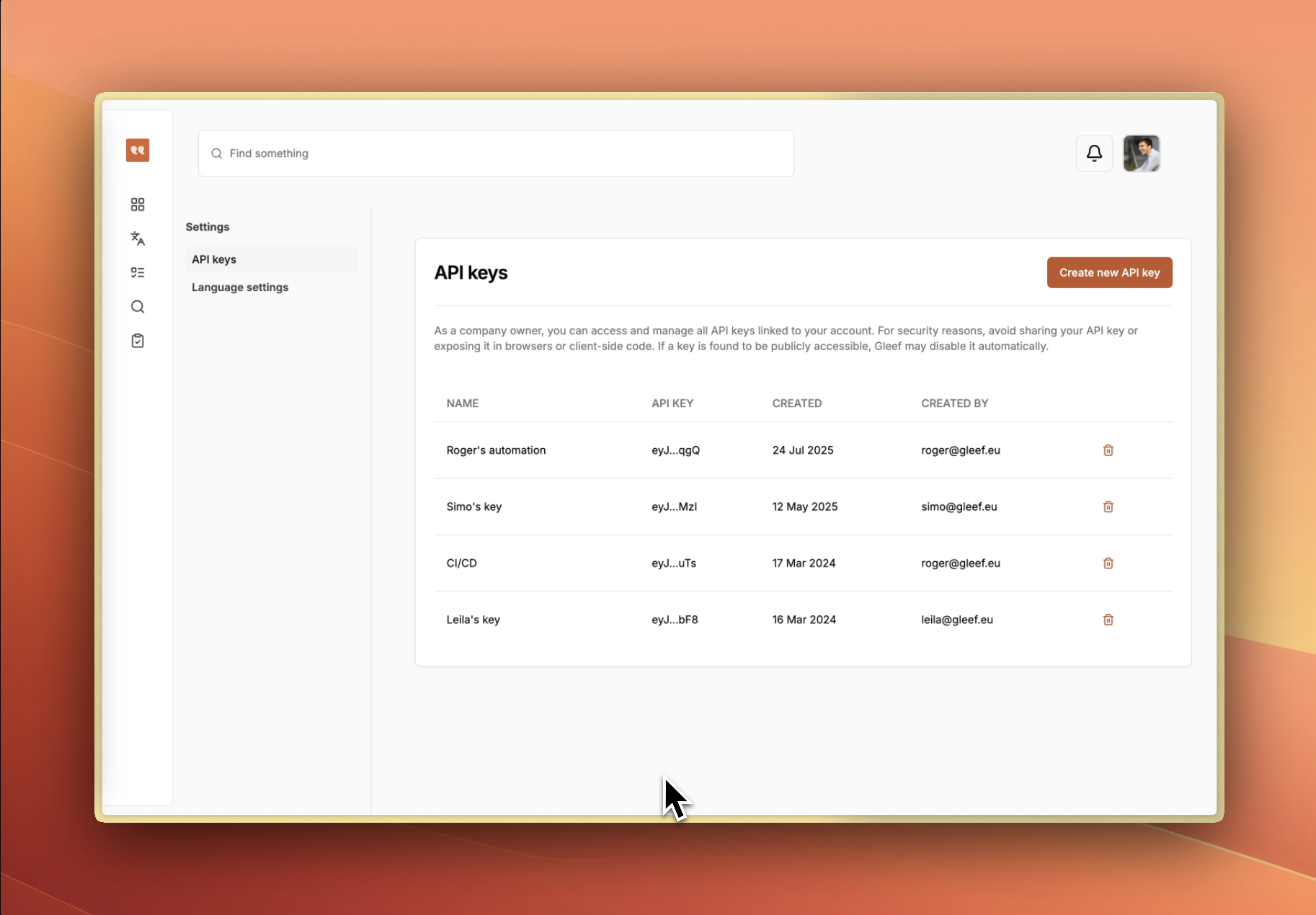 ## API Keys
### Creating API Keys
1. **Navigate to Settings** → **API Keys**
2. **Click "Create API Key"**
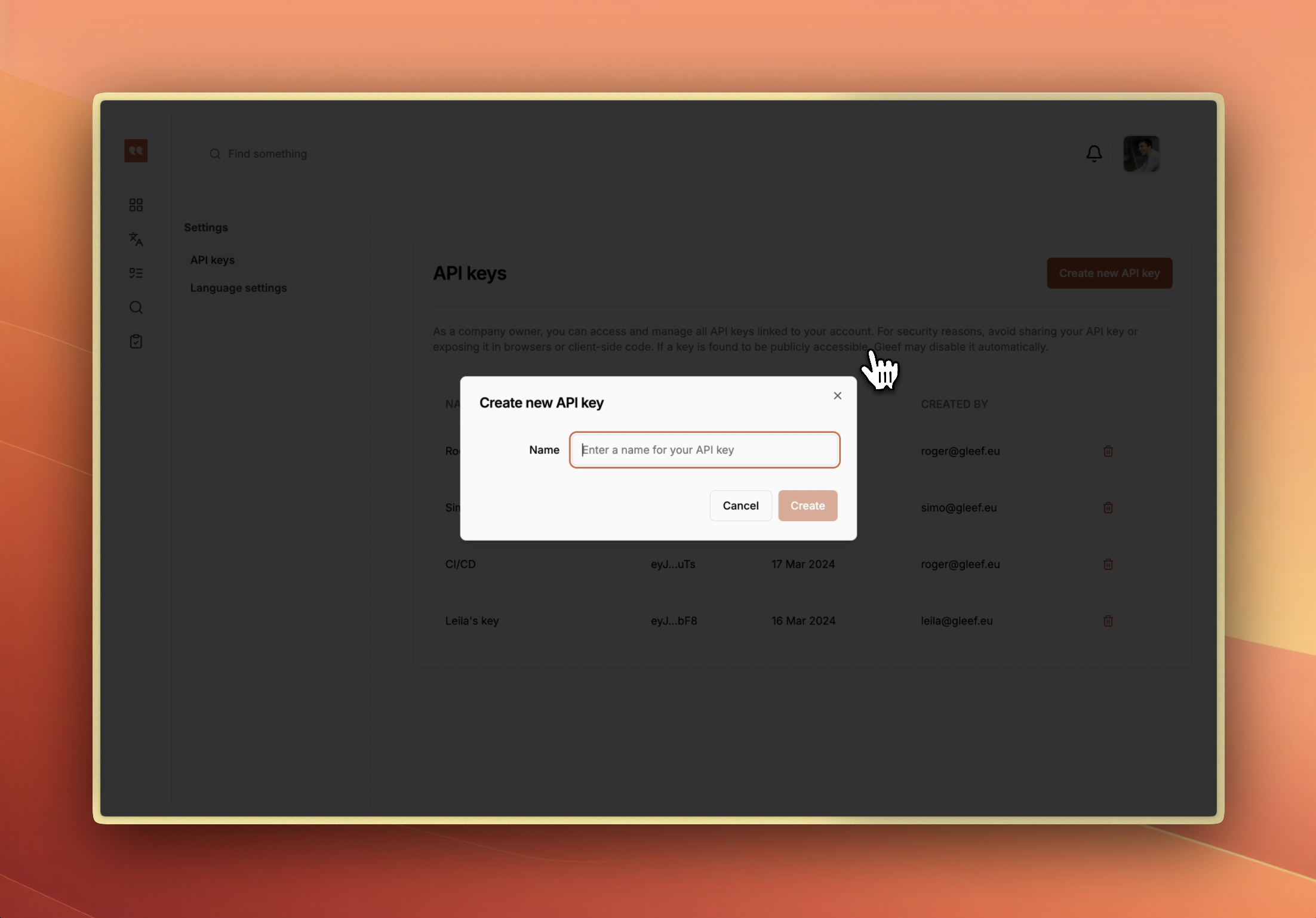
3. **Enter descriptive name** for identification
4. **Copy key immediately** - shown only once for security
## API Keys
### Creating API Keys
1. **Navigate to Settings** → **API Keys**
2. **Click "Create API Key"**
3. **Enter descriptive name** for identification
4. **Copy key immediately** - shown only once for security
 ### Using API Keys
**CLI Integration:**
```bash theme={null}
gleef config set api-key YOUR_API_KEY
```
**Custom Applications:**
```http theme={null}
Authorization: Bearer YOUR_API_KEY
```
### Key Management
* **Partial key display** - only first/last characters shown for security
* **Delete keys** when no longer needed
* **Update integrations** when rotating keys
* **Store securely** - never commit to version control
## Language Settings
### Source Language
* **Set primary language** for your project
* **Reference language** for AI translations
* **Default language** for new translation keys
### Target Languages
* **Add target languages** from supported locales
* **Language picker** shows flags and names
* **Remove unused languages** to simplify interface
* **Settings sync** across all Studio features
## Project Configuration
### Company Settings
* **Organization name** and branding
* **Team member management** and permissions
* **Billing and subscription** information
* **Integration preferences** and defaults
### Workflow Preferences
* **Default review settings** for new changesets
* **Publication preferences** - auto-publish vs review-required
* **Notification settings** for team collaboration
* **Export format preferences** for file generation
## Integration Setup
### Figma Integration
* **Connect Figma account** for design context
* **Default file permissions** for team access
* **Preview settings** for design display
* **URL validation** and format requirements
### External Tools
* **Translation memory** system connections
* **CI/CD pipeline** integration setup
* **Webhook endpoints** for automated workflows
* **Third-party tool** API configurations
## Security and Privacy
### Access Control
* **User permissions** and role management
* **API key security** and rotation policies
* **Session management** and timeout settings
* **Two-factor authentication** (if available)
### Data Management
* **Export capabilities** for data portability
* **Backup settings** and retention policies
* **Data deletion** and privacy controls
* **Compliance settings** for regulatory requirements
### Using API Keys
**CLI Integration:**
```bash theme={null}
gleef config set api-key YOUR_API_KEY
```
**Custom Applications:**
```http theme={null}
Authorization: Bearer YOUR_API_KEY
```
### Key Management
* **Partial key display** - only first/last characters shown for security
* **Delete keys** when no longer needed
* **Update integrations** when rotating keys
* **Store securely** - never commit to version control
## Language Settings
### Source Language
* **Set primary language** for your project
* **Reference language** for AI translations
* **Default language** for new translation keys
### Target Languages
* **Add target languages** from supported locales
* **Language picker** shows flags and names
* **Remove unused languages** to simplify interface
* **Settings sync** across all Studio features
## Project Configuration
### Company Settings
* **Organization name** and branding
* **Team member management** and permissions
* **Billing and subscription** information
* **Integration preferences** and defaults
### Workflow Preferences
* **Default review settings** for new changesets
* **Publication preferences** - auto-publish vs review-required
* **Notification settings** for team collaboration
* **Export format preferences** for file generation
## Integration Setup
### Figma Integration
* **Connect Figma account** for design context
* **Default file permissions** for team access
* **Preview settings** for design display
* **URL validation** and format requirements
### External Tools
* **Translation memory** system connections
* **CI/CD pipeline** integration setup
* **Webhook endpoints** for automated workflows
* **Third-party tool** API configurations
## Security and Privacy
### Access Control
* **User permissions** and role management
* **API key security** and rotation policies
* **Session management** and timeout settings
* **Two-factor authentication** (if available)
### Data Management
* **Export capabilities** for data portability
* **Backup settings** and retention policies
* **Data deletion** and privacy controls
* **Compliance settings** for regulatory requirements